
Long story short I have a PC that a buddy of mine built for me that I only use for watching occasional movies, storing music, movies, pics, and such. When I say it is rarely used I mean I have probably used it 15 times in 2 years(laptops are all we really need). Well this computers BIOS does not recognize my hard drive now and I am getting a "reboot and select proper booting device" message. Right before this it was running for exactly one hour and then freezing. Through some research I feel the problem is the HD firmware. My question is 1) Has anyone ever heard of this and 2) If it is indeed a firmware update that is needed, then how do you update a hard drive that the BIOS will not recognize? Any help would be greatly appreciated.
Computer guys........I need a little help
- Thread starter UGA12
- Start date
You are using an out of date browser. It may not display this or other websites correctly.
You should upgrade or use an alternative browser.
You should upgrade or use an alternative browser.

Long story short I have a PC that a buddy of mine built for me that I only use for watching occasional movies, storing music, movies, pics, and such. When I say it is rarely used I mean I have probably used it 15 times in 2 years(laptops are all we really need). Well this computers BIOS does not recognize my hard drive now and I am getting a "reboot and select proper booting device" message. Right before this it was running for exactly one hour and then freezing. Through some research I feel the problem is the HD firmware. My question is 1) Has anyone ever heard of this and 2) If it is indeed a firmware update that is needed, then how do you update a hard drive that the BIOS will not recognize? Any help would be greatly appreciated.
Josh has been texted. :0008

if you have the windows disk - put it in and in the bios have it read cd rom first
there should be a repair option that i would try 1st
- if that doesn't work you can still get to a dos prompt
from there you can hopefully do a system roll back or sfc scannow or some other dos related fix
if you don't have the original windows disk for that computer - you can use any windows disk to be able to get to a dos prompt
there should be a repair option that i would try 1st
- if that doesn't work you can still get to a dos prompt
from there you can hopefully do a system roll back or sfc scannow or some other dos related fix
if you don't have the original windows disk for that computer - you can use any windows disk to be able to get to a dos prompt
if you have the windows disk - put it in and in the bios have it read cd rom first
there should be a repair option that i would try 1st
- if that doesn't work you can still get to a dos prompt
from there you can hopefully do a system roll back or sfc scannow or some other dos related fix
if you don't have the original windows disk for that computer - you can use any windows disk to be able to get to a dos prompt
Do not have disk, but did run a windows repair a few days ago when I logged on and it pulled up a window that gave me that option. I really thought that would fix it, but after an hour it froze. Did a hard shutdown and turned it back on the next day. Pulled up as it should and after an hour it froze. Been getting message ever since.


Where would I get said disk without purchasing windows?
what version do you have
what version do you have
lol, no idea. I know how that sounds, but I have never even looked since I basically just use it for storage. I would guess 7 given that was the latest out when he built it and he likes the latest and greatest stuff. He is out of town on business or I would be asking him all these things. It is no big deal since it is not a necessity, but I am one of those that really likes to find a solution quick once I start digging into something.
Would a system rollback or restore actually fix the firmware issue if indeed thats what it is. I wasnt under the impression that it would. What do you feel a restore would do, or better put what do you think it would fix that screwed up?
lol, no idea. I know how that sounds, but I have never even looked since I basically just use it for storage. I would guess 7 given that was the latest out when he built it and he likes the latest and greatest stuff. He is out of town on business or I would be asking him all these things. It is no big deal since it is not a necessity, but I am one of those that really likes to find a solution quick once I start digging into something.
Would a system rollback or restore actually fix the firmware issue if indeed thats what it is. I wasnt under the impression that it would. What do you feel a restore would do, or better put what do you think it would fix that screwed up?
A firmware issue would not arise two years down the road. Firmware is mainly permanent code in the hardware. I say mainly because you can do software updates to firmware from manufacturers who supply firmware updates. If it was a software update to firmware (firmware relates to hardware) then yes, system restore could go to a period of time before the software update.
Things I would try
f2 to get in to the bios and there should be a way to load defaults or optimal default. Try that.
I would double check the start up order and make sure it hasn't changed - make sure there isn't a floppy disk setting above the hdd. you can have cd rom first or hdd first.
Make sure you do not have a disk in the cd rom - As silly as this is, if the order is to read cd first and a non bootable cd was in there- that could stop it from loading
http://www.ultimatebootcd.com/ - I've never used this site but I saw that you can create a bootable windows disk from the site - you mentioned you had other computers - any cd that came with them could probably get you to a dos prompt.
i'm guessing it doesn't go far enough to f8 in to boot options?
A firmware issue would not arise two years down the road. Firmware is mainly permanent code in the hardware. I say mainly because you can do software updates to firmware from manufacturers who supply firmware updates. If it was a software update to firmware (firmware relates to hardware) then yes, system restore could go to a period of time before the software update.
Things I would try
f2 to get in to the bios and there should be a way to load defaults or optimal default. Try that.
I would double check the start up order and make sure it hasn't changed - make sure there isn't a floppy disk setting above the hdd. you can have cd rom first or hdd first.
Make sure you do not have a disk in the cd rom - As silly as this is, if the order is to read cd first and a non bootable cd was in there- that could stop it from loading
http://www.ultimatebootcd.com/ - I've never used this site but I saw that you can create a bootable windows disk from the site - you mentioned you had other computers - any cd that came with them could probably get you to a dos prompt.
i'm guessing it doesn't go far enough to f8 in to boot options?
Ok just turned it on and this is the window that popped up allowing me to get to desk top. I fully expect it to freeze up by 12 am. Does this tell you anything?
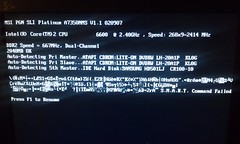
Ok just turned it on and this is the window that popped up allowing me to get to desk top. I fully expect it to freeze up by 12 am. Does this tell you anything?
That gibberish makes me think that the master boot record is bad
go to start
type cmd in the search
right click cmd and select run as admin
from the dos prompt - let's fix mbr - be right back
at c prompt type
BootRec.exe /fixmbr
press enter
BootRec.exe /FixBoot
press enter
BootRec.exe /RebuildBcd
press enter
if you can - while connected to the internet - download ccleaner
http://www.filehippo.com/download_ccleaner/
run the cleaner -
after it gets done
got to the registry and scan then fix
after that
go tools - then startup and disable everything - it will be under the windows tab
go to start up and turn
BootRec.exe /fixmbr
press enter
BootRec.exe /FixBoot
press enter
BootRec.exe /RebuildBcd
press enter
if you can - while connected to the internet - download ccleaner
http://www.filehippo.com/download_ccleaner/
run the cleaner -
after it gets done
got to the registry and scan then fix
after that
go tools - then startup and disable everything - it will be under the windows tab
go to start up and turn
when you have ccleaner opened
it will tell you the version of windows you have
processor type and speed
amount of ram
and graphics card
post those if you dont mind - or screen shot it
it will tell you the version of windows you have
processor type and speed
amount of ram
and graphics card
post those if you dont mind - or screen shot it
have 7 home premium. promt command would not work. Said was not recogonized command.
this box won't load? or the command won't work?
Attachments
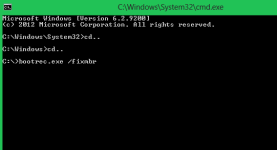
command didnt work. Dead in the water again as it froze. Downloaded cc and was 77% done when everything froze. Back on laptop.
command didnt work. Dead in the water again as it froze. Downloaded cc and was 77% done when everything froze. Back on laptop.
damn
Got a box stating changes needed a restart to take affect when I first got to the desktop, so going to give it a minute and then restart in hopes that is the windows fix I ran the other day.
When I restarted it displayed the same "Reboot and select proper boot device message"
Thanks for the help and timely fashion. Wont keep you, but if you dont mind in the next few days come back to this thread and let me bounce some ideas off ya. Thanks brother!
Thanks for the help and timely fashion. Wont keep you, but if you dont mind in the next few days come back to this thread and let me bounce some ideas off ya. Thanks brother!
Got a box stating changes needed a restart to take affect when I first got to the desktop, so going to give it a minute and then restart in hopes that is the windows fix I ran the other day.
ok - good
the freezing has to be frustrating
you can hit ctrl+shift+esc to bring up the task manager to see what is running and taking up the memory
i wanted you to do it thru ccleaner but you can quickly do it
by going start
type msconfig in to the search bar
go to startup
select all and disable - that will turn off software that loads at start up
if the computer freezes again after that then it is a windows issue or a hardware issue
