

A lot of work to do
- Thread starter MadJack
- Start date
You are using an out of date browser. It may not display this or other websites correctly.
You should upgrade or use an alternative browser.
You should upgrade or use an alternative browser.

If you can make the quick reply box a little smaller it would help with that link
As is, you have to scroll up from the very bottom to see that link because of the size of the quick reply box
When you're finished reading the last post in a thread it's right there with no scrolling.
Maybe I see things differently than everybody else? Using Chrome.

yes chromeWhen you're finished reading the last post in a thread it's right there with no scrolling.
Maybe I see things differently than everybody else? Using Chrome.
If I am at the bottom of the page there should be a way to navigate out
the navbar at the bottom has a link to the front page, contact us and top
If the quick reply box was a little smaller then a link back to the forum that you were viewing would be visible when at the bottom of the page
Attachments
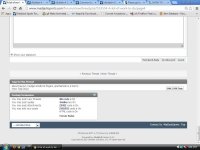
yes chrome
If I am at the bottom of the page there should be a way to navigate out
the navbar at the bottom has a link to the front page, contact us and top
If the quick reply box was a little smaller then a link back to the forum that you were viewing would be visible when at the bottom of the page
You don't have the quick navigation tool?


Yes, I doYou don't have the quick navigation tool?
It is farther up, just above the quick reply box
If the quick reply box was a little smaller it would show while at the bottom of the page
As I'm reading your post I can see it. After I reply to your post I can see it, without any scrolling.Yes, I do
It is farther up, just above the quick reply box
If the quick reply box was a little smaller it would show while at the bottom of the page
Maybe I don't understand what you're talking about.
The Quick Nav Tool is in a good place - It just doesn't display when at the bottom of the page because the quick reply box is 3/4 of a screen tall.
On the old site, the quick reply box was much smaller and the quick nav box was displayed
I think the size of the quick reply box should fall somewhere between the old site and the current
On the old site, the quick reply box was much smaller and the quick nav box was displayed
I think the size of the quick reply box should fall somewhere between the old site and the current
Attachments
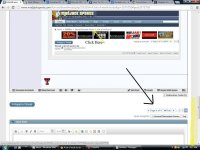
As I'm reading your post I can see it. After I reply to your post I can see it, without any scrolling.
Maybe I don't understand what you're talking about.
are you at the bottom of the page?
are you at the bottom of the page?
You can see where I'm at in my pic. I have to scroll from there to get to the bottom.

- Mar 2, 2006
- 4,794
- 120
- 0
Three things:
1) The names of the poster who started the thread needs to more visible. Now, it is difficult to see who started a thread - can you get rid the "Started by" and date stamp under the title of the thread, and just have the title with the author? Like before, the author was easily identifiable:
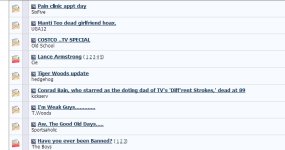
2) Can you change the favicon in the browser tab? Now, it is the same as many other forums, and I liked when it was easily distinguishable (used to be the MJs icon).
3) I really liked the side-bar navigation.
Just my thoughts...
1) The names of the poster who started the thread needs to more visible. Now, it is difficult to see who started a thread - can you get rid the "Started by" and date stamp under the title of the thread, and just have the title with the author? Like before, the author was easily identifiable:
2) Can you change the favicon in the browser tab? Now, it is the same as many other forums, and I liked when it was easily distinguishable (used to be the MJs icon).
3) I really liked the side-bar navigation.
Just my thoughts...
Three things:
1) The names of the poster who started the thread needs to more visible. Now, it is difficult to see who started a thread - can you get rid the "Started by" and date stamp under the title of the thread, and just have the title with the author? Like before, the author was easily identifiable:
View attachment 1080
2) Can you change the favicon in the browser tab? Now, it is the same as many other forums, and I liked when it was easily distinguishable (used to be the MJs icon).
3) I really liked the side-bar navigation.
Just my thoughts...
I'm really proud of that modification. :0008
Not feeling the "Red Sides'' on the Home Page......Can we try "Pink".........:shrug:
I was trying something and when I saw that red I actually laughed.
I am constantly having to login?
Next to Quick Navigation ... it tells you the forum you are in ... next to that it says Top ... Top is useless as it just takes you to the top of the PAGE you are on ... old forum had GO and would take you back to the FORUM and be UPDATED with any new posts ... be great to have that feature back :0074
and the What's New button has update for EVERY forum and not for the one you are viewing
having fun yet :mj07:
Next to Quick Navigation ... it tells you the forum you are in ... next to that it says Top ... Top is useless as it just takes you to the top of the PAGE you are on ... old forum had GO and would take you back to the FORUM and be UPDATED with any new posts ... be great to have that feature back :0074
and the What's New button has update for EVERY forum and not for the one you are viewing
having fun yet :mj07:
I am constantly having to login?
Next to Quick Navigation ... it tells you the forum you are in ... next to that it says Top ... Top is useless as it just takes you to the top of the PAGE you are on ... old forum had GO and would take you back to the FORUM and be UPDATED with any new posts ... be great to have that feature back :0074
and the What's New button has update for EVERY forum and not for the one you are viewing
having fun yet :mj07:
The "Top" button is not useless if you want to go to the top.
The dropdown does the same as your "go" button but use the dropdown and you can go to the forum you are on or any of the other forums. It's better after you get used to it.
